Responsive Viewport Resizer
Dynamically adjust iframe width and height to simulate any device breakpoint. Perfect for checking CSS media query thresholds.
The professional-grade website previewer and mobile website viewer trusted by 50,000+ developers and designers. Preview website layouts on iPhone, Android, or tablet — get an instant website mobile preview and website phone view. No installations, no limits.
Enter a URL above and click Preview to see your website on this device
Click any device below to instantly preview website layouts at its exact screen size. Use this website mobile viewer to test iPhones, Android phones, tablets, and more — see the website phone view in seconds.
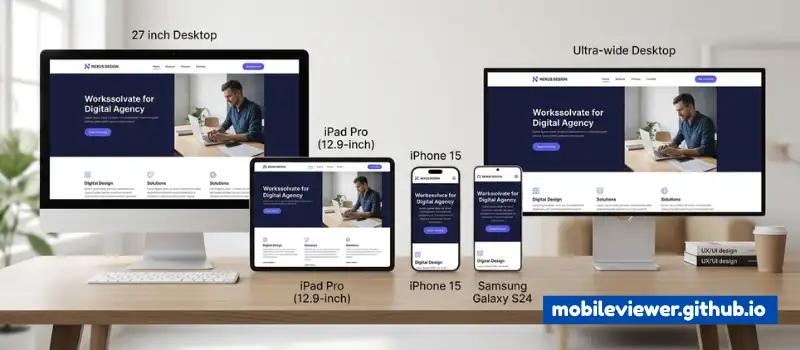
Over 63% of all web traffic now comes from mobile devices. A broken mobile experience doesn't just frustrate visitors — it costs you rankings, conversions, and credibility.
The majority of your visitors are on smartphones. If your site doesn't look perfect on a 390px screen, you're losing them before they even read a headline.
Spot text overlaps, oversized images, horizontal scrollbars, and broken navigation menus instantly before your users do.
Google's mobile-first indexing means your mobile experience directly affects how you rank in search results. Fix mobile issues and climb the SERPs.
You don't need a drawer full of devices. Simulate iPhones, Android phones, iPads, and custom resolutions right in your browser for free.
A seamless mobile experience keeps users engaged and turns visitors into customers. Mobile-optimized CTAs and forms convert up to 5× better.
"Neglecting mobile optimization is not a technical debt — it's a revenue leak. Every pixel out of place on mobile is a customer walking out the door."
— Mobile UX Research, 2024
Follow this professional workflow to ensure your site looks perfect on every screen size
Open Mobile Viewer and paste your website address (e.g., yoursite.com) into the URL bar. The tool automatically adds https:// if missing. Works with any publicly accessible website.
Choose from Mobile, Tablet, or Desktop view. Then pick a device preset — iPhone 15, Samsung Galaxy, iPad Pro, and more — or enter a custom width and height for any specific resolution.
Click Load and the site renders inside an accurate device frame. Toggle between portrait and landscape, zoom in/out, and interact with the live preview exactly as a real user would.
Click links, scroll content, trigger dropdowns, and test forms. Identify issues like oversized tap targets, slow-loading images, clipped navigation bars, or broken font scaling.
Fix issues in your code — add CSS media queries, adjust font sizes, refine padding — then click Refresh to confirm changes instantly. No browser restarts needed.
Everything you need to build, test, and ship pixel-perfect responsive websites
Dynamically adjust iframe width and height to simulate any device breakpoint. Perfect for checking CSS media query thresholds.
Ensure your site's audio elements and accessibility cues are sounding correct across different frequencies and stereo channels.
Verify microphone permissions and audio input quality for web apps utilizing voice commands, recording, or WebRTC features.
Debug webcam streams and test photo-capture functionality to ensure seamless media integration on mobile and desktop browsers.
Generate a QR code for any URL and instantly test mobile access by scanning with your phone. Great for staging sites.
Capture screenshots of any website at multiple device resolutions for visual comparison and stakeholder reports.
Test color contrast ratios against WCAG AA/AAA standards to ensure text is readable on all device types and in all lighting conditions.
Simulate different browsers and crawlers including Googlebot to see how your site responds to various user agent strings.
View your URL simultaneously across multiple device sizes in a grid layout. Spot responsive inconsistencies at a glance.
A draggable overlay that shows CSS breakpoints in real-time on any loaded page. Check layout shifts at every responsive threshold.
Simulate network offline conditions to test Progressive Web App (PWA) behavior, service workers, and cached content delivery.
Wrap your website preview in realistic device frames — perfect for client presentations, app store screenshots, and marketing materials.
Test your website's page speed and Core Web Vitals. Get actionable recommendations to improve LCP, FID, CLS, and mobile performance scores.
Built for developers, designers, QA engineers, and digital professionals who demand precision
Load any website instantly. Our optimized rendering provides a real-time, interactive preview — not a static screenshot. Scroll, click, and navigate as a real user would.
Test on iPhone 15, Samsung Galaxy S23, iPad Pro, Pixel 8, and many more. Every preset uses the exact viewport dimensions of the real device.
Switch between portrait and landscape modes instantly. Ensure your layout handles CSS orientation changes and flexbox wrapping correctly.
Generate a QR code for any preview URL and scan it with a real phone — the fastest way to cross-validate simulator results with physical hardware.
100% browser-based. No Chrome extensions, no npm packages, no Electron apps. Just open Mobile Viewer and start testing in seconds.
All core features — mobile preview, device simulation, QR generation, screenshot capture — are completely free with no sign-up required.
No setup, no learning curve — just paste and preview
Enter the website address you want to check. Works with any live URL or local dev server.
Pick mobile, tablet, or desktop, then select from 20+ real device presets or enter custom dimensions.
Interact with the live preview, spot issues, fix your code, and refresh to confirm. Repeat until perfect.
Everything you need to know about the Mobile Viewer tool
To check the mobile view of your website using Mobile Viewer, paste your URL into the input bar, select Mobile as the device type, choose a device preset (like iPhone 15 or Samsung Galaxy), and click Load. The tool renders your site in a realistic phone frame at the exact device resolution so you can see precisely how mobile visitors experience your page.
Yes — Mobile Viewer is 100% free with no hidden charges, no registration, and no premium tiers. All features including mobile preview, QR code generation, device simulation, and the full tools suite are available to everyone for free.
Mobile Viewer includes presets for iPhone 15, iPhone 15 Pro Max, iPhone SE, Samsung Galaxy S23, Google Pixel 8, OnePlus 12, iPad, iPad Pro 11", and Android tablets. You can also set any custom width and height for testing at exact non-standard breakpoints.
Some websites block being loaded inside iframes using the X-Frame-Options or Content-Security-Policy HTTP headers. This is a security policy on the target website, not a limitation of Mobile Viewer. For sites you own, you can adjust these headers. You can also use our QR Code feature to scan the URL on a real device instead.
The simulation uses the exact CSS viewport dimensions of each device preset, giving you a highly accurate visual representation of layout, font scaling, and responsive breakpoints. For full fidelity testing (including GPU rendering differences and browser-specific behavior), we recommend supplementing with physical device testing — use our QR Code feature for the fastest physical device check.
Yes. You can load any URL including http://localhost:3000, local IP addresses, or staging server URLs. Make sure the server is accessible from your browser. For locally hosted sites, the QR code feature requires your phone to be on the same network.
Absolutely. Mobile Viewer works as a professional website previewer and website mobile viewer — ideal for showing clients exactly how their website mobile preview looks on iPhone, Android, or tablet. You can also preview website URLs and share the website phone view via QR code for real-device validation.
Join 50,000+ developers and designers who use Mobile Viewer to build better responsive websites